You’re planning the family reunion. You’ve handled the venue, the food, and the guest list.
Now you need the one thing that truly brings everyone together: the memories.
Old family photos are the heart of any reunion. A slideshow of grandpa as a boy, a display of your parents’ wedding—these are the moments that spark joy and connection.
But there’s a problem. Many of your best family photos are probably torn, faded, covered in scratches, or stained. Displaying them as-is feels like showing a dimmed, broken memory.
This guide will show you how to fix that—easily and instantly.
We’ll show you how to prepare your photos for the big event. First, we’ll cover the best way to digitize photos, and then, how to restore them instantly, turning them into the highlight of your reunion.
Why You MUST Use Restored Photos for Your Reunion
Before we get into the “how,” let’s be clear: this is about creating an experience. This is the “wow” factor.
- It Sparks Conversation: A clear, restored photo of a shared ancestor will have cousins and aunts pointing and sharing stories you’ve never heard.
- It Honors Your Elders: Displaying a beautifully restored portrait of the family patriarch or matriarch is a powerful tribute.
- It Engages the Kids: Young members of the family are captivated by seeing their parents or grandparents as children, especially when the photos are clear and colorful.
- It Creates a Lasting Gift: Restored photos can be printed and given as take-home favors, a far more meaningful gift than a customized keychain.
The bottom line: Restored photos transform a simple get-together into an unforgettable event.
The Old Way is Too Slow for Event Planning
Traditionally, if you wanted to restore a box of old family photos, you had two choices:
- Professional Restoration: This gives great results but is incredibly slow and expensive. You could pay
50−50-50−200 for a single photo and wait weeks. That’s not practical when you’re on a reunion budget and timeline. - DIY with Complex Software: Using a tool like Photoshop requires skill and a lot of time. As an event organizer, you have a million other things to do.
Neither of these options works well for preparing a large batch of photos for an event.
The New Way: AI Restoration in Seconds
This is where AI changes the game for family reunion planners. A tool like BringBack AI is built for this exact task.
It’s an online platform that uses artificial intelligence to automatically fix your old photos. You don’t need any technical skills.
Here’s why it’s the perfect tool for the job:
- Instant Results: Upload a photo, and it’s restored in under 30 seconds. You can prepare dozens of photos in the time it takes to watch a TV show.
- Extremely Affordable: Restore 5 photos for just $2.49. This lets you build a huge, beautiful collection for your reunion without draining your budget.
- Automatic and Effortless: The AI handles everything. It removes scratches, fixes tears, corrects faded colors, and sharpens focus with one click.
- Completely Private: Your family photos are personal. BringBack.pro deletes uploaded files within 30 minutes, ensuring your memories remain yours alone.
Step-by-Step: How to Digitize Old Photos from Your Family Collection
Let’s get tactical. Here is your complete workflow for preparing photos for the big day.
Step 1: Gather and Curate Your Photos
Before you restore, you need to collect.
- Reach Out to Family: Ask key family members (especially older ones) to look for their best old photos. Give them a deadline!
- Choose a Theme: Don’t just grab random pictures. Create categories that will tell a story at your reunion.
- Weddings Through the Generations
- “Guess the Baby” Photos
- Family Vacations Over the Years
- Generational Portraits (Grandmother, Mother, Daughter)
Step 2: Scanning the photos for restoration
Before you can restore anything, you need a good digital copy. This process is often called digitising photographs, and it’s the most crucial step. Getting a clean digital image is essential.
Here are the two best methods to convert photographs to digital.
Option A: Using a Scanner to Digitize Photos
This method generally gives you the highest quality and is the best way to digitize photos if you have access to a scanner.
- What You Need: A flatbed scanner is ideal. These are often part of an all-in-one home printer.
- Clean the Scanner Bed: Wipe the glass with a lint-free cloth to avoid dust spots on your scan.
- Choose Your Settings: You’ll see an option for resolution, measured in DPI (dots per inch).
- For standard-size photos (4×6, 5×7), use 300 DPI.
- For very small photos (like old passport-sized portraits), use 600 DPI.
- Save as a JPEG or PNG: This will create a high-quality file on your computer, ready for the next step.
This process to scan photos to digital is straightforward and ensures you capture as much detail as possible from the original print.
Option B: Using Your Phone to Digitize Photos Instantly
Don’t have a scanner? No problem. Your smartphone is an incredibly powerful tool to digitize photos quickly, especially when you’re gathering pictures from multiple relatives.
- What You Need: Your smartphone and a good photo scanning app.
- We recommend Google’s PhotoScan. It’s free and uses a special process to capture glare-free, high-resolution images.
- Find Good, Even Lighting: Place the photo on a flat surface near a window, but out of direct, harsh sunlight. Avoid using your phone’s flash, as it creates a terrible glare.
- Follow the App’s Instructions: PhotoScan will guide you to move your phone over the photo to capture it from multiple angles. This is how it removes glare and distortion.
This is the easiest way to digitize old photos when you’re at a relative’s house and want to quickly capture a treasure from their photo album.
For an in-depth guide about how to scan photos with mobile you can go through this article written at Wired.com
Step 3: Restore with BringBack.pro (The Magic Step)
Now that you have your digital files, it’s time for the fun part.
Forget spending weeks waiting for a professional or hours struggling with complicated software. We’re going to use an AI tool called BringBack AI because it’s perfect for this exact task.
Here’s why it’s the best choice for a busy reunion planner:
- It’s Instant: The entire restoration process takes under 30 seconds per photo. You can prepare an entire slideshow in one afternoon.
- It’s Affordable: You can restore 5 high-quality photos for just $2.49. This is a tiny investment for a massive impact on your event.
- It’s Automatic: The AI does all the work. It removes scratches, repairs tears, brightens faded colors, and sharpens blurry faces with a single click.
- It’s Private and Secure: Your personal family photos are safe. Uploaded files are deleted from their servers within 30 minutes.
This is the fast and easy part.
- Go to the BringBack.pro website.
- Upload the scanned photo you want to fix.
- Let the AI automatically repair the damage.
- In less than 30 seconds, your restored photo is ready.
- Download the high-quality, vibrant “After” image.

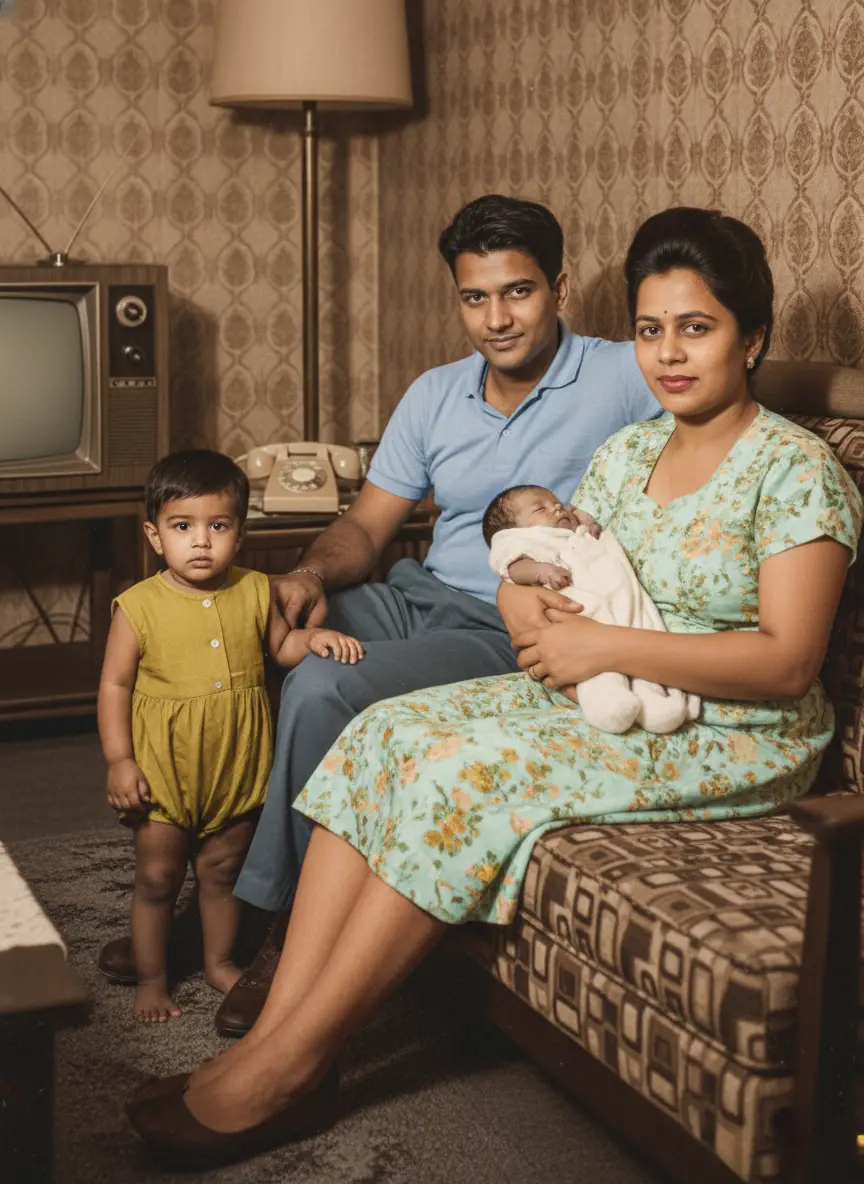
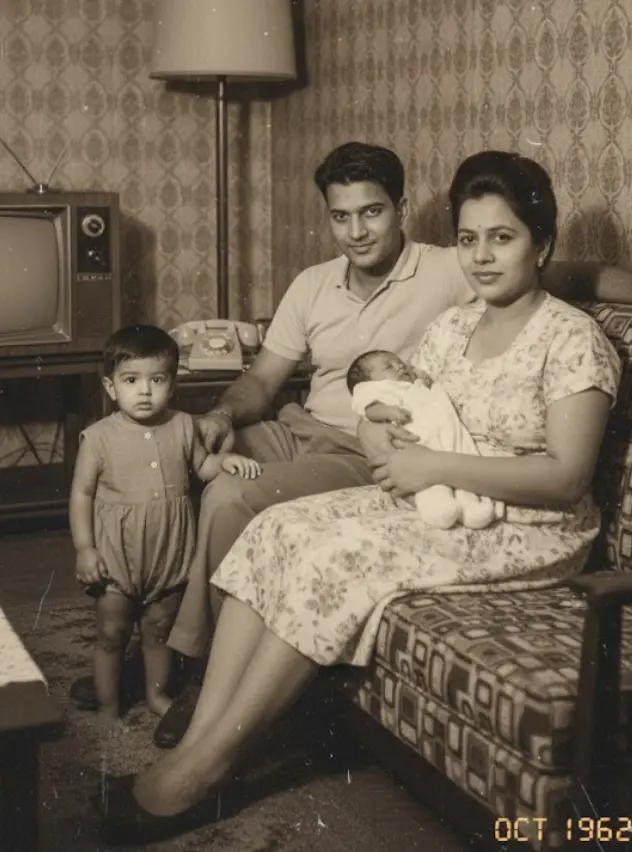
Look at the difference. A faded, scratched photo becomes a clear, engaging portrait ready for display.
Step 4: How to Display Your Restored Photos at the Reunion
Now that you have a folder full of beautifully restored images, how will you show them off? Think beyond just taping them to a wall.
Digital Display Ideas:
- Create a Rolling Slideshow: This is the easiest and most dynamic option. Use a TV or a projector to have the restored photos cycle throughout the event. You can add names and dates to each photo.
- Make a Short “Family History” Video: Use a simple video editor to combine the restored photos with music. You can even ask an older relative to narrate a short story to go with it.
Physical Display Ideas:
- A “Memory Lane” Clothesline: A very popular and charming idea. String twine between two points and use clothespins to hang the printed restored photos. You can even find LED photo clips for a magical touch.
- Themed Photo Boards: Get large foam boards and create collages based on your themes (e.g., “The Family Through the Decades”).
- “Who Am I?” Game Board: Print the restored baby photos, number them, and have family members write down their guesses. It’s a perfect icebreaker.
- A Photo Gallery Wall: Use frames of the same color or style to create a sophisticated, gallery-style display on a feature wall.
Take It to the Next Level: Animated Photos
Want to create a moment at the reunion that no one will ever forget?
BringBack AI has a feature that adds subtle, lifelike animation to still photos. Imagine your family gathered around the slideshow. A beautiful, restored photo of your great-grandfather appears on screen. And then, he softly blinks and a gentle smile forms on his face.
It’s a breathtaking way to connect with the past and is guaranteed to be the talk of the reunion. Go and animate old photos now.
Your Quick Action Plan for Amazing Reunion Photos
Planning a family reunion is a huge undertaking. Don’t let damaged photos keep you from creating a truly memorable event.
- Start Gathering Photos Now: Don’t wait until the last minute.
- Digitize Everything: Scan or use a scanning app.
- Restore with BringBack.pro: Turn your entire collection of old, damaged photos into a vibrant archive in one afternoon.
- Choose Your Display Method: Decide between a slideshow, video, or a creative physical display.
By investing a tiny amount of time and money, you can create a powerful, emotional centerpiece for your reunion that will have your family talking for years to come.