Old photographs are the heart of a family tree. They put a face to a name, a story to a date.
But what happens when those faces are hidden behind cracks, stains, and the faded yellow of age?
For too long, genealogists and family historians have hit a visual dead end. A priceless photo of a great-great-grandmother is too damaged to share. A family portrait is torn, obscuring a key ancestor. You have the photo, but the story is lost to damage.
This guide will show you how to fix that.
We’ll walk you through a new, powerful way to restore your ancestry photos in seconds, not weeks. This is your before-and-after guide to bringing your family tree to life.
Why Every Genealogist Should Restore Old Photos
Before we get to the “how,” let’s talk about the “why.” Restoring a damaged photo isn’t just about making it look better.
- It’s about discovery. A clearer face can help you or other family members identify an unknown person in a group photo.
- It’s about preservation. Digital restoration creates a clean, permanent copy, safeguarding the memory even if the original print fades further.
- It’s about storytelling. A vibrant, restored photo engages your family—especially younger generations—in their history in a way a damaged one can’t. You’re not just repairing a photo; you’re clarifying your family’s story.
The Old Way vs. The New AI Way
For decades, photo restoration was a job for expensive specialists.
The Traditional Method:
- You’d find a professional restorer.
- Pay anywhere from $50 to $200 per photo.
- Wait weeks or even months to get the result.
This process is too slow and costly for the average family historian who might have dozens, if not hundreds, of photos to repair.
The New AI Method (with BringBack.pro):
- You upload your scanned photo to a website.
- AI technology automatically detects and repairs the damage.
- The entire process takes under 30 seconds.
- The cost? Around $0.50 per photo.
This is a complete game-changer for genealogy research. It makes photo restoration accessible to everyone.
Meet Your New Tool: BringBack AI
We’re focusing on BringBack AI because it’s tailor-made for the needs of a family historian. It’s not a complex piece of software like Photoshop. It’s a simple, web-based tool that does one thing exceptionally well: it brings old photos back to life.
Here’s what makes it stand out for ancestry photo restoration:
- Automatic Damage Repair: The AI is trained to identify and fix the things that plague old photos: tears, scratches, stains, fading, and discoloration.
- Incredibly Fast: You get your restored, high-quality photo in under 30 seconds.
- Stunningly Affordable: You can restore 5 photos for just $2.49. No subscriptions, just a one-time payment.
- Privacy First: This is critical. Your photos are automatically deleted from their servers within 30 minutes. They are never stored, shared, or used for training.
Step-by-Step Guide: Restore Your First Ancestor Photo
Ready to see the magic? Let’s walk through restoring a photo from your collection.
Step 1: Choose and Digitize Your Photo
First, pick a damaged photo from your family archive. It could be a portrait, a group shot, or an old wedding photo.
For the best results, you need a good digital copy.
- Use a scanner if you have one. Scan at a resolution of at least 300 DPI (dots per inch), or 600 DPI for very small photos.
- No scanner? Use your phone. Place the photo on a flat, well-lit surface. Use an app like Google’s PhotoScan to capture a glare-free, high-quality image.

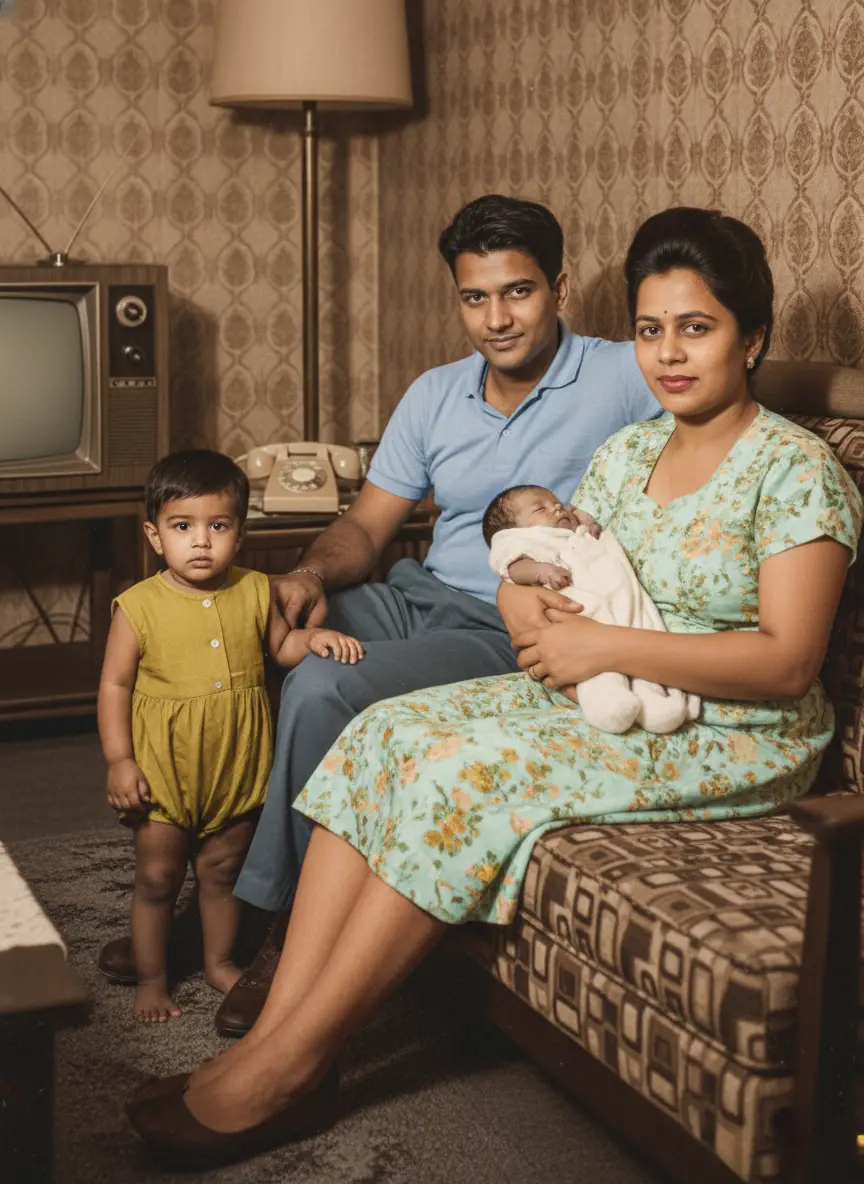
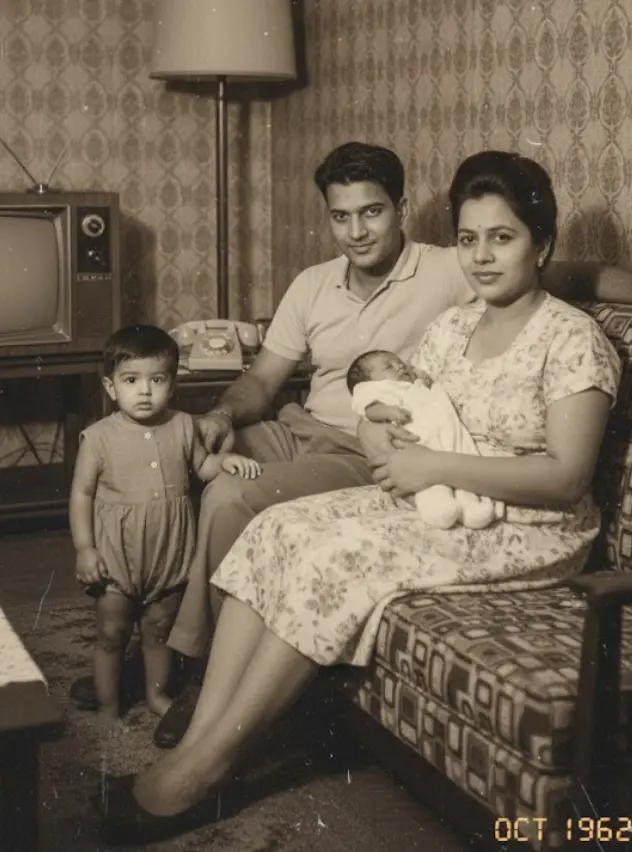
This is your “Before” image. Notice the completely torn and teared pieces, the faded colors. Just wait and watch.
Step 2: Upload Your Photo to BringBack.pro
Navigate to the BringBack.pro website. The process is incredibly straightforward. You don’t need an account to start. Simply upload the digital file you just created.
Step 3: Restore with a Single Click
Once uploaded, the AI gets to work. It automatically scans for damage and begins the restoration process. You don’t need to do anything—no sliders, no tools, no technical skills required.
The platform does all the heavy lifting in about 30 seconds.
Step 4: Download Your “After” Masterpiece
When it’s done, you’ll be presented with the restored image.

This is your “After” image. The tear is gone. The scratch has vanished. The colors are rich and natural, restoring the original contrast and depth. The focus is sharper, revealing details in their faces and clothing you might have never noticed before.
You can now download this high-quality restored image and add it directly to your Ancestry family tree. The difference is night and day.
okay let me tell you about something crazy….
Go a Step Further: Animating Your Ancestors Photo
Here’s where the experience becomes truly profound. BringBack.pro also has a feature to add subtle, lifelike animation to your restored photos.
- See them blink and smile. The AI identifies facial landmarks and creates gentle, natural movements.
- It’s respectful. The animations are not goofy or exaggerated. They are designed to feel like a real, living moment captured in time.
This AI Photo Animation feature costs a few dollars extra (a $4.99 credit pack) but the emotional impact of seeing an ancestor’s gentle smile for the first time is priceless. It’s a powerful way to feel a deeper connection to your roots.
Showcasing Your Restored Family History
Once you have your restored and animated photos, don’t just leave them on your hard drive.
- Update Your Family Tree: Replace the old, damaged photos on Ancestry, MyHeritage, or your personal genealogy software. The visual upgrade will make your entire tree more compelling.
- Create Digital Frames: Use the built-in feature to add a beautiful digital frame, complete with styles, colors, and captions.
- Share with Family: Post the before-and-after images on social media or in family groups. It’s a fantastic way to spark conversations and gather more stories from relatives.
Answering Your Key Questions
As a genealogist, you’re right to be careful with precious family documents. Here are some direct answers to common concerns.
- Is my data safe?
Yes. BringBack.pro has a strict privacy-first policy. Uploaded photos are deleted in 30 minutes, and the restored versions are deleted after 7 days. They never use your photos for anything else. - What if the restoration isn’t perfect?
The AI is excellent, but if you have a photo with extreme damage, you might see a small artifact. BringBack.pro offers a free re-restoration guarantee. If the automatic detection misses something, you can run it again at no cost. - Is it really that cheap?
Yes. The model is built for accessibility. At $2.49 for 5 high-quality restorations, it makes it feasible to work through your entire family archive without breaking the bank.
Your Family History is Waiting
Stop letting damaged photos be a dead end in your research. Every faded picture holds a story, a personality, a clue to your past. With AI restoration, you no longer have to guess what’s behind the cracks and fading.
You can now bring those faces back into the light.
Take one photo from your collection—just one—and try it for yourself. Witnessing that first ancestor come back to life in vibrant detail will change the way you see your family tree forever.