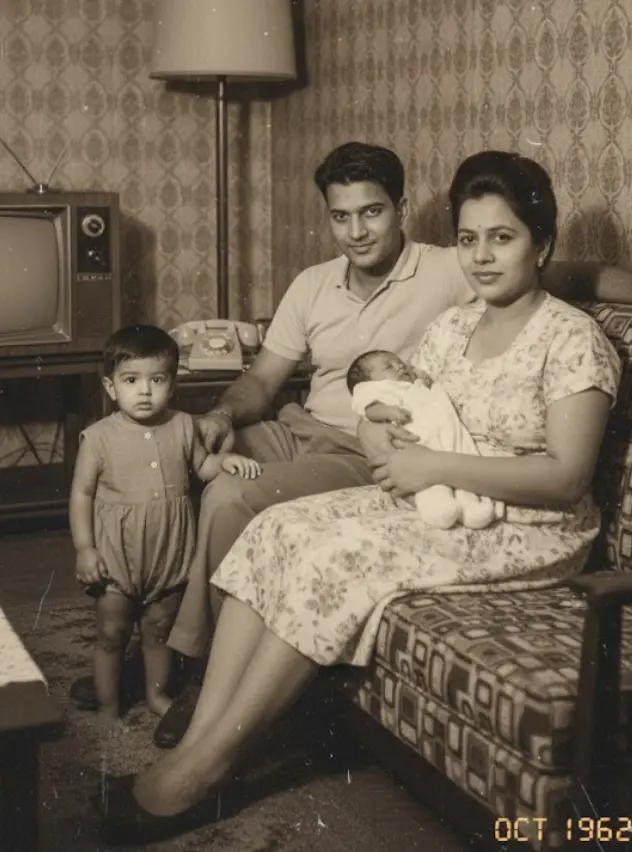
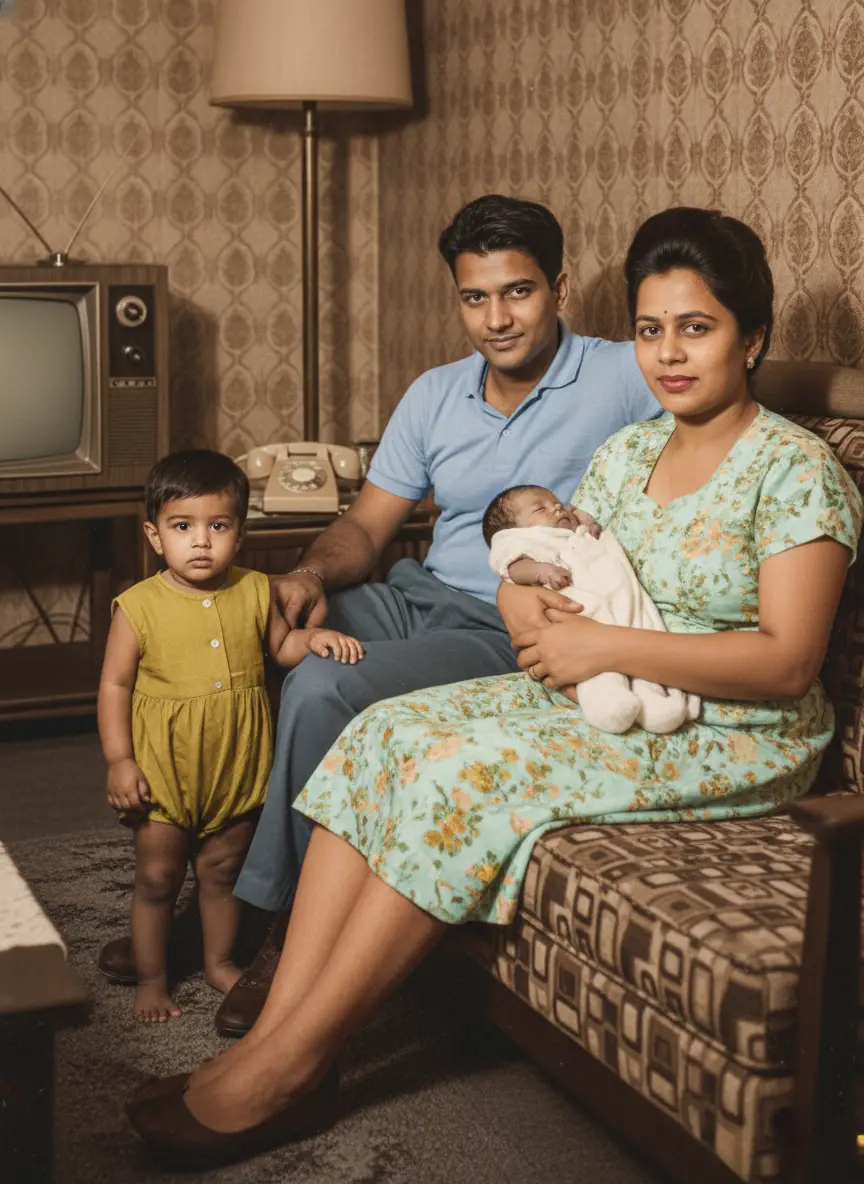
Unblur & Sharpen Old Photos
Remove film grain, reduce digital noise, and recover clearer facial details from soft or blurry family photos with AI.
 Before
 After
AfterEvery type of noise,
perfectly cleaned.
From grainy concert photos to noisy night shots, see how our AI removes every type of digital noise with precision.


How to Unblur and Sharpen Old Photos
Follow these 4 simple steps to unblur soft faces and remove heavy film noise with AI.
- 01
Upload Blurry or Noisy Photo
Upload out-of-focus portraits, low-res scans, or noisy film prints.
Supports wallet photos, small digital images, and vintage prints.
Step 01 Complete - 02
AI Detects Facial Landmarks
Our facial enhancement engine maps eyes, nose, mouth, and skin texture.
Differentiates between natural facial features and camera motion blur.
Step 02 Complete - 03
HD Details Reconstructed
BringBack sharpens fuzzy facial details and removes heavy film grain.
Upscales resolution up to 4x without synthetic artificial distortion.
Step 03 Complete - 04
Compare & Download HD
Review your unblurred photo side-by-side with the original before downloading.
Print-ready high resolution perfect for large wall frames.
Step 04 Complete
Why our Denoise
works like magic.
Advanced AI meets signal processing to clean your photos without losing what matters.
Preserves Fine Details
Removes noise while keeping hair, fabric textures, and important details perfectly intact.

Handles Any Noise Type
Color noise, luminance grain, digital artifacts - our AI understands all forms of image noise.
Smart Area Detection
Applies stronger denoising to backgrounds while preserving detail in faces and subjects.

Color Accuracy
Maintains original colors and tones while removing color noise and digital artifacts.


Edge Preservation
Keeps important edges and contours sharp while smoothing out unwanted grain and noise.
Privacy Protection
Generated media stays in your account until you delete it. See our Privacy Policy for processors and retention.
How our AI
understands and removes noise.
Advanced signal processing meets machine learning to separate noise from actual image content.
Noise Pattern Analysis
Our AI first identifies the type of noise in your photo—whether it's high-ISO grain, color noise from low light, or digital artifacts from compression.
Content Preservation
While removing noise, the AI carefully preserves important details like hair texture, fabric patterns, and facial features that could be mistaken for noise.
Selective Processing
Different areas of your photo get different treatment—smooth backgrounds get heavy denoising while detailed areas like faces get gentle, precise cleaning.
Quality Verification
Before delivering results, our AI checks that no important details were lost and that the noise reduction looks natural and professional.
Pay once.
No subscription.
Exact credit costs: restore 1, family portrait / add person 2, animation 10, hug video 19. Starter cannot fund animation or hug.
Restoration Starter
Low-risk way to restore a few important photos. Not enough credits for animation or hug video.
Value Pack
Enough credits for restorations plus animation or family reunions.
Family Pack
For albums, multi-person projects, and the private Family Memory Book.
Questions
& answers.
Everything you need to know about AI photo denoising and how BringBack works.
How does AI photo denoising actually work?
Our AI analyzes the patterns of noise in your photo and distinguishes between unwanted grain and important image details.
What types of noise can BringBack remove?
We can remove virtually any type of digital noise: high-ISO grain, color noise, luminance noise, digital artifacts from old cameras, compression artifacts, and low-light noise. Our AI handles both uniform noise patterns and complex, irregular noise with equal effectiveness.
Will denoising make my photos look plastic or fake?
No! Our AI is specifically designed to maintain natural texture and detail while removing noise. Unlike basic noise reduction tools that can make photos look over-smoothed or artificial, our system preserves skin texture, fabric details, and other important elements.
How much does photo denoising cost?
We offer 4 high-quality photo denoising cleanups for just $4.99 - no subscription required. This one-time payment gives you professional-grade noise removal in seconds, compared to traditional photo editing services that charge $30-100+ per photo.
Can you clean very grainy or noisy photos?
Yes! Our AI excels at removing even heavy noise from challenging photos like high-ISO night shots or old digital camera images. While results depend on the original photo, we can often make severely noisy images look clean and professional.
How long does the denoising process take?
Most photos are processed and cleaned in under 30 seconds. Simply upload your noisy photo and watch the grain disappear in real-time. No waiting hours or days like traditional photo editing services.
Is my data safe during processing?
Photos are processed securely for the feature you request. Generated media stays in your account until you delete it. We do not use your family photos to train general-purpose AI models. See our Privacy Policy.
What if the results aren't what I expected?
We offer a 30-day money-back guarantee. If you're not satisfied with the denoising results, we'll refund your purchase - no questions asked. We're confident in our AI's ability to clean your photos, but we stand behind every enhancement.
What does denoising a photo mean?
Denoising removes unwanted grain or noise from photos—especially from low-light or high-ISO images—while preserving fine details.
How does AI denoising work on BringBack?
BringBack's AI denoising uses advanced deep learning models to differentiate noise from real detail, delivering clean, sharp images quickly via our cloud-based engine.
Do I need to denoise before editing?
Yes—denoising first is recommended. Applying noise reduction before adding contrast or sharpening helps avoid amplifying noise.
How long does denoising take?
Most images are denoised in under a minute, depending on size and resolution. Larger RAW files may take slightly longer.
Is my uploaded photo secure?
Photos are processed securely. Generated media stays in your account until you delete it from My Media. See our Privacy Policy.
Does BringBack preserve fine details when denoising?
Yes. Our AI is trained to remove noise while intelligently retaining key details like textures and edges, avoiding oversmoothing.
Can I batch denoise multiple photos?
Yes—with a paid plan, you can upload and denoise multiple photos in a single batch for faster workflow.
What image formats are supported?
BringBack supports JPEG, PNG, and RAW formats for denoising to accommodate various user needs.
Will denoising affect image quality?
No—instead of degrading quality, denoising enhances clarity and usability, especially for noisy, underexposed, or high ISO shots.
Is the web app mobile-friendly?
Yes—you can upload and denoise photos directly from your phone using our responsive web interface.
Can I use BringBack for commercial photos?
Yes—denoised photos can be used for editorial, commercial, or personal projects, with full usage rights included.
Do I lose color or dynamic range during denoising?
No—our AI preserves color fidelity and dynamic range while effectively reducing noise.
More Tools to Preserve Your Family Memories
Restore Damage
Repair scratches, tears, and sepia fading while preserving authentic facial character.
Reunite Loved Ones
Combine separate individual photos into one natural, high-definition family portrait.
Add Person to Photo
Seamlessly insert a missing relative or passed loved one into an existing family snapshot.
Colorize Black & White
Bring historical black & white photographs to life with historically accurate realistic colors.
Ready to restore
your memories?
Every photo holds a story. Don't let damage steal your precious moments. Restore them forever in seconds.